We Use CookiesWe use cookies to enhance the security, performance, functionality and for analytical and promotional activities. By continuing to browse this site you are agreeing to our privacy policy

10 Best Epson Ecotank Printers 2026 in the United States


How do we rank products for you?

Our technology thoroughly searches through the online shopping world, reviewing hundreds of sites. We then process and analyze this information, updating in real-time to bring you the latest top-rated products. This way, you always get the best and most current options available.

headphones-stars

Our Top Picks

#1

Winner

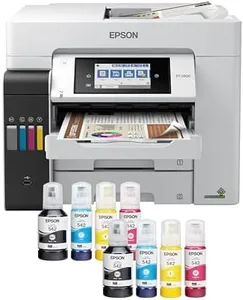
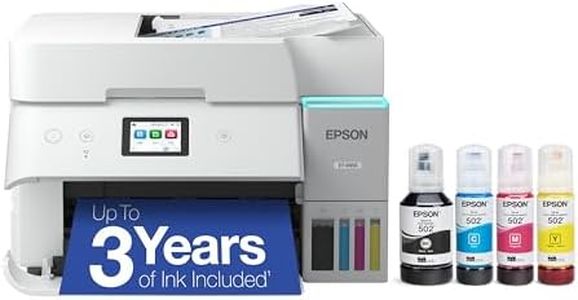
Epson EcoTank ET-2803 Wireless Color All-in-One Cartridge-Free Supertank Printer with Scan, Copy and AirPrint Support

Rating
10.0
Chosen by1,156
Print Quality
Ink Tank Capacity
Connectivity Options

Most important from
19713 reviews

Print Quality
Print quality is high, setup is simple, and the printer is user-friendly.
Ink Tank Capacity
The ink refill bottles are a game changer, eliminating the need for constant cartridge replacements.
Connectivity Options
The Epson app is very user-friendly and intuitive, making it easy to print from mobile devices.
Paper Handling
Paper loading capacity is limited, which can be annoying, but overall performance is satisfactory.

The Epson EcoTank ET-2803 is an all-in-one inkjet printer designed to be efficient and economical with its innovative cartridge-free solution. Instead of traditional cartridges, it uses high-capacity ink tanks that require less frequent refilling, saving users up to 90% on ink costs. This is particularly beneficial for heavy users who print in high volumes. The ink included in the box is enough to last up to 2 years, making it a stress-free option for those who don't want to worry about frequent ink purchases.

Print quality is impressive, thanks to Epson's Micro Piezo Heat-Free technology, providing sharp text and vibrant color photos. However, the print speed is relatively slow at 10 ppm for black and 5 ppm for color, which might not be ideal for users needing rapid printouts. The ET-2803 comes with a built-in scanner and copier, adding versatility, and supports wireless connectivity, including AirPrint and the Epson Smart Panel app for easy mobile printing. It also offers hands-free voice-activated printing.

On the downside, it lacks features like dual-sided printing and a high input sheet capacity, which might be a limitation for office settings requiring more robust performance. Its compact size and light weight (8.8 pounds) make it suitable for home or small office use, but users looking for high-speed and high-volume printing might find it less adequate. The printer is also environmentally friendly, reducing cartridge waste. Despite its limitations, the Epson EcoTank ET-2803 stands out for its cost-efficiency and print quality, making it a good choice for households and small offices with moderate printing needs.

Rating
10.0
Chosen by1,156
Print Quality
Ink Tank Capacity
Connectivity Options

Most important from
19713 reviews

Print Quality
Print quality is high, setup is simple, and the printer is user-friendly.
Ink Tank Capacity
The ink refill bottles are a game changer, eliminating the need for constant cartridge replacements.
Connectivity Options
The Epson app is very user-friendly and intuitive, making it easy to print from mobile devices.
Paper Handling
Paper loading capacity is limited, which can be annoying, but overall performance is satisfactory.
#2

Epson EcoTank Photo ET-8550 Wireless Wide-format Color All-in-One Supertank Printer with Scanner Copier, Ethernet and 4.3-inch Colorfull Touchscreen

Rating
8.5
Print Quality
Print Speed
Ink Tank Capacity

Most important from
2273 reviews

Print Quality
The Epson EcoTank Photo ET-8550 is an absolute joy to use, with gloss prints on premium paper being the finest ever seen.
Print Speed
Prints on various materials like sticker paper, cardstock, and holographic paper with great accuracy and speed.
Ink Tank Capacity
Ink tanks are huge and transparent, making it easy to monitor ink levels and top them up without mess.
Connectivity Options
Wireless printing is seamless, allowing quick prints from phones and tablets with just a few clicks.
Paper Handling
The printer supports numerous media types and has thoughtful features like a special paper slot for 4x6 prints.

The Epson EcoTank Photo ET-8550 is a versatile all-in-one printer that excels in delivering lab-quality photos and vibrant graphics. One of its major strengths is the cartridge-free printing system that uses high-yield ink bottles, significantly reducing printing costs. It can print up to 6,200 color pages with a single set of ink bottles, making it economical and environmentally friendly by reducing cartridge waste. The print quality is impressive, thanks to the Claria ET Premium 6-color inks and high-accuracy printhead, producing sharp text and vibrant colors. It can print a 4 x 6-inch photo in approximately 15 seconds, which is quite fast for photo printing.

The printer supports various media types, including borderless photos up to 13 x 19 inches and specialty media like cardstock and CDs/DVDs. It also features auto 2-sided printing, enhancing its utility for various projects. Connectivity is another strong point, with options like Ethernet, wireless, and mobile device support via the Epson Smart Panel app. The 4.3-inch color touchscreen and voice-activated printing add to its ease of use.

On the downside, the print speed for regular documents is moderate, with 16 pages per minute for monochrome and 12 pages per minute for color, which may not be sufficient for high-volume office tasks. The maximum input sheet capacity is 100 sheets, which might be limiting for heavy users. Additionally, while the printer is robust with numerous features, its larger size and weight (24.5 pounds) might require ample space for setup. The Epson EcoTank Photo ET-8550 is ideal for users who prioritize photo printing quality and cost-efficiency, making it a great option for creative projects and home offices.

Rating
8.5
Print Quality
Print Speed
Ink Tank Capacity

Most important from
2273 reviews

Print Quality
The Epson EcoTank Photo ET-8550 is an absolute joy to use, with gloss prints on premium paper being the finest ever seen.
Print Speed
Prints on various materials like sticker paper, cardstock, and holographic paper with great accuracy and speed.
Ink Tank Capacity
Ink tanks are huge and transparent, making it easy to monitor ink levels and top them up without mess.
Connectivity Options
Wireless printing is seamless, allowing quick prints from phones and tablets with just a few clicks.
Paper Handling
The printer supports numerous media types and has thoughtful features like a special paper slot for 4x6 prints.
#3

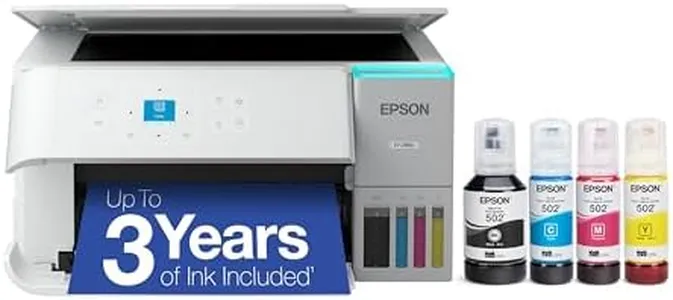
Epson EcoTank ET-2800 Wireless Color All-in-One Cartridge-Free Supertank with Scan and Copy, The Ideal Basic Home Printer - White

Rating
7.9
Print Quality
Ink Tank Capacity

Most important from
19713 reviews

Print Quality
Print quality is excellent, delivering sharp text and vibrant color photos without any ink smudges or off colors.
Ink Tank Capacity
The ink longevity is remarkable; even after printing hundreds of photos, the ink tanks are still mostly full.

The Epson EcoTank ET-2800 is designed as a practical solution for home printing needs, especially for those who want to cut down on ink costs. One of its standout features is the innovative cartridge-free system, which uses high-capacity ink tanks. This allows users to save up to 90% on replacement ink costs, making it a great choice for families or individuals who print frequently. The printer comes equipped with enough ink to last up to two years, which minimizes the hassle of running out of ink unexpectedly.

Print quality is another strong point for the ET-2800. Thanks to Epson’s Micro Piezo technology, it delivers sharp text and vibrant color photos, suitable for a variety of paper types. Users can also benefit from the built-in scanner and copier, which adds versatility to everyday tasks.

On the downside, the print speed might not impress those who need to print large volumes quickly; it manages 10 pages per minute in monochrome and 5 pages per minute in color, which is on the slower side compared to some competitors. Additionally, while it supports wireless and wired connectivity, the lack of automatic duplex printing means users will have to manually flip pages to print on both sides, which could be a minor inconvenience for some.

Another consideration is the printer's size and weight; at 8.8 pounds, it’s relatively portable, but may take up a bit of space in a home office setup. The EcoTank ET-2800 is ideal for home users looking for an affordable and reliable printer that can handle basic printing, scanning, and copying tasks without the ongoing hassle of changing cartridges frequently. Its environmental benefits, such as reduced cartridge waste, also make it an attractive option for eco-conscious consumers.

Rating
7.9
Print Quality
Ink Tank Capacity

Most important from
19713 reviews

Print Quality
Print quality is excellent, delivering sharp text and vibrant color photos without any ink smudges or off colors.
Ink Tank Capacity
The ink longevity is remarkable; even after printing hundreds of photos, the ink tanks are still mostly full.

Buying Guide for the Best Epson Ecotank Printers

When choosing an Epson EcoTank printer, it's important to consider your specific needs and how different features will meet those needs. EcoTank printers are known for their high-capacity ink tanks, which can save you money on ink in the long run. However, there are several other factors to consider to ensure you get the best printer for your requirements.
Print QualityPrint quality is measured in dots per inch (DPI). Higher DPI means better print quality, which is important if you need to print high-resolution images or detailed documents. For general home or office use, a DPI of 600x600 is usually sufficient. If you need to print professional-quality photos or graphics, look for a printer with a higher DPI, such as 1200x2400 or more.
Print SpeedPrint speed is measured in pages per minute (PPM). This spec is important if you need to print large volumes of documents quickly. For occasional printing, a speed of 10-15 PPM is adequate. For more frequent or high-volume printing, look for a printer with a speed of 20 PPM or higher. Consider your typical print job size and how often you print to determine the right speed for you.
Ink Tank CapacityInk tank capacity determines how much ink the printer can hold, which affects how often you'll need to refill it. Larger tanks mean fewer refills and lower long-term costs. If you print frequently, look for a printer with larger tanks. For occasional use, smaller tanks may be sufficient. Consider your printing habits and how much convenience matters to you.
Connectivity OptionsConnectivity options include USB, Wi-Fi, and Ethernet. Wi-Fi allows for wireless printing from multiple devices, which is convenient for home or office use. Ethernet is useful for a more stable connection in an office setting. USB is a basic option for direct connection to a single computer. Think about how you plan to use the printer and choose the connectivity options that best suit your needs.
Paper HandlingPaper handling refers to the types and sizes of paper the printer can accommodate, as well as the capacity of the paper tray. If you need to print on various paper sizes or types, such as envelopes or photo paper, make sure the printer supports them. A larger paper tray is useful for high-volume printing, reducing the need to refill paper frequently. Consider the types of documents you print and how often you print to determine the right paper handling features.
Additional FeaturesAdditional features can include scanning, copying, and faxing capabilities, as well as touchscreen controls and mobile printing support. If you need an all-in-one device, look for a printer with these multifunction features. Touchscreen controls can make the printer easier to use, and mobile printing support allows you to print directly from your smartphone or tablet. Think about which extra features will be most useful for your daily tasks.

FAQ