We Use CookiesWe use cookies to enhance the security, performance, functionality and for analytical and promotional activities. By continuing to browse this site you are agreeing to our privacy policy

9 Best Gaming Laptop Cooling Pads 2026 in the United States
How do we rank products for you?

Our technology thoroughly searches through the online shopping world, reviewing hundreds of sites. We then process and analyze this information, updating in real-time to bring you the latest top-rated products. This way, you always get the best and most current options available.

headphones-stars

Our Top Picks

#1

Winner

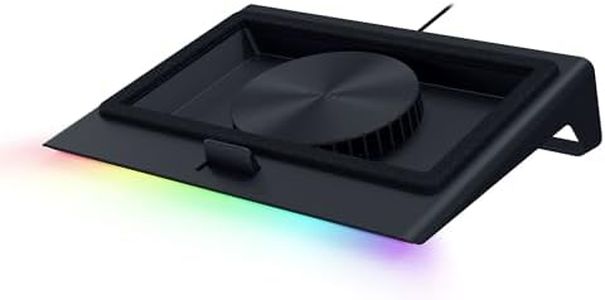
Razer Laptop Cooling Pad: Adaptive Smart - Intelligent Fan Control - Airtight Pressure Chamber - Fits Most Laptops & Macbooks 14” to 18" - Preset & Custom Fan Curves - 3 Port USB Type A - Chroma RGB

Rating
10.0
Chosen by1,144
Noise Level
Adjustability
Build Quality and Materials

Most important from
459 reviews

Noise Level
While the cooling pad excels in lowering temperatures, it is notably loud at medium to high fan speeds, comparable to the sound of a microwave.
Adjustability
The pad's fan is powerful, backed by a wall plug, and offers customizable settings through Razer Synapse, allowing for manual RPM adjustments.
Build Quality and Materials
Users appreciate the convenience of extra USB ports and the effectiveness of the airtight pressure chamber in sealing cold air inside.
USB Ports
The lack of USB-C ports is a minor drawback, as the pad only includes three USB Type-A ports, which may limit future-proofing.

The Razer Laptop Cooling Pad is designed with the gaming enthusiast in mind, featuring smart cooling capabilities and adaptive fan control to maintain optimal laptop performance. With its Razer Hyperboost technology, this cooling pad can automatically adjust fan speeds, providing improved thermal management for laptops ranging from 14 to 18 inches. This is particularly useful for gamers looking to sustain higher power limits without overheating issues.

One of the standout features is the airtight pressure chamber, equipped with foam seals that prevent cool air leakage, coupled with a robust 140 mm brushless fan that reaches up to 3000 RPM. This combination aims to reduce CPU, GPU, and surface temperatures effectively. The cooling pad also offers adjustable fan curves, allowing users to fine-tune performance based on noise preferences or specific cooling needs via the Razer Synapse software.

In terms of practicality, the Razer Cooling Pad includes a 3-port USB Type A hub, making it easy to connect additional peripherals like webcams or gaming controllers. The ability to customize controls through remappable multi-function buttons adds an extra layer of convenience.

However, the cooling pad's weight and bulkiness, at 2.66 kilograms (5.85 pounds), could affect its portability. Additionally, while its plastic construction is adequate, some users might prefer more premium materials for the price point. The noise level is variable depending on the fan speed, potentially being noticeable at higher settings.

To conclude, the Razer Laptop Cooling Pad is a solid choice for gamers or heavy laptop users seeking an efficient cooling solution with customizable settings. It excels in performance and versatility but may not be the best option for those prioritizing portability or premium build materials.

Rating
10.0
Chosen by1,144
Noise Level
Adjustability
Build Quality and Materials

Most important from
459 reviews

Noise Level
While the cooling pad excels in lowering temperatures, it is notably loud at medium to high fan speeds, comparable to the sound of a microwave.
Adjustability
The pad's fan is powerful, backed by a wall plug, and offers customizable settings through Razer Synapse, allowing for manual RPM adjustments.
Build Quality and Materials
Users appreciate the convenience of extra USB ports and the effectiveness of the airtight pressure chamber in sealing cold air inside.
USB Ports
The lack of USB-C ports is a minor drawback, as the pad only includes three USB Type-A ports, which may limit future-proofing.
#2

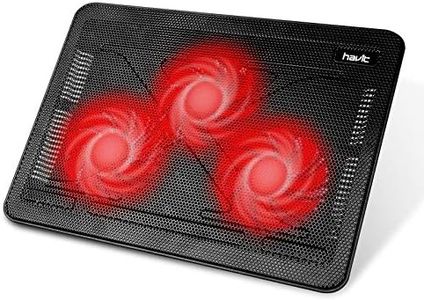
Havit HV-F2056 15.6-17 Inch Laptop Cooler Cooling Pad - Slim Portable USB Powered (3 Fans) (Black+Red)

Rating
9.4
Fan Size and Number
Noise Level
Portability

Most important from
44630 reviews

Fan Size and Number
The three fans deliver strong airflow that reduces laptop temperatures by 10–15°C during gaming sessions.
Noise Level
Its ultra-quiet operation means the fans hum softly without interfering with keyboard sounds or game audio.
Portability
The slim, lightweight design makes it highly portable and easy to carry between locations without adding bulk.
Build Quality and Materials
The metal mesh surface provides a sturdy base, but the included rubber pads to prevent slipping can shift over time.
USB Ports
Dual USB ports include one for powering the cooler and another for passthrough, enhancing connectivity without losing laptop ports.
Adjustability
Adjustable height settings improve ergonomics, making long gaming or work sessions more comfortable.
Airflow (CFM)
Works effectively on firm surfaces but airflow is less efficient on soft surfaces like blankets or cushions.

The Havit HV-F2056 is a slim and lightweight cooling pad designed for 15.6 to 17-inch gaming laptops. It features three fans that provide good airflow to keep your laptop cooler during intense gaming sessions. The fans are ultra-quiet, minimizing noise distractions while playing.

This cooling pad also functions as an ergonomic stand with two adjustable height settings, making it comfortable for extended use. Its build combines sturdy metal mesh and plastic, offering a stable surface for your laptop without adding much bulk—ideal for portability.

Additionally, it includes a built-in dual USB hub, allowing you to connect extra devices without losing a USB port on your laptop. It uses a USB-A connection for power, so if your laptop only has USB-C ports, an adapter will be needed. The three-fan setup effectively balances cooling, noise, and portability, making it a practical and quiet cooling solution that also improves comfort and connectivity.

Rating
9.4
Fan Size and Number
Noise Level
Portability

Most important from
44630 reviews

Fan Size and Number
The three fans deliver strong airflow that reduces laptop temperatures by 10–15°C during gaming sessions.
Noise Level
Its ultra-quiet operation means the fans hum softly without interfering with keyboard sounds or game audio.
Portability
The slim, lightweight design makes it highly portable and easy to carry between locations without adding bulk.
Build Quality and Materials
The metal mesh surface provides a sturdy base, but the included rubber pads to prevent slipping can shift over time.
USB Ports
Dual USB ports include one for powering the cooler and another for passthrough, enhancing connectivity without losing laptop ports.
Adjustability
Adjustable height settings improve ergonomics, making long gaming or work sessions more comfortable.
Airflow (CFM)
Works effectively on firm surfaces but airflow is less efficient on soft surfaces like blankets or cushions.
#3

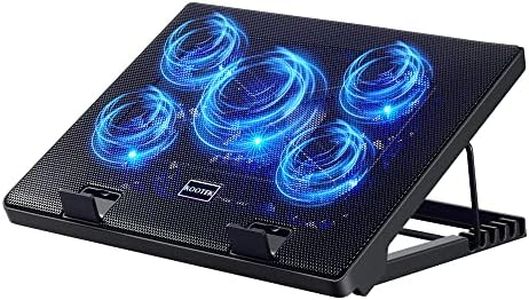
Kootek Laptop Cooling Pad, Laptop Cooler with 5 Quiet Fans for 12"-17" Computer PC Notebook Gaming Laptop Fan, Height Adjustable Laptop Cooling Stand Laptop Accessories, Blue

Rating
9.4
Airflow (CFM)
Noise Level
Adjustability

Most important from
14552 reviews

Airflow (CFM)
It's very sturdy, easy to use, and the airflow is great.
Noise Level
Quiet fans ensure no distractions during work or gaming sessions.
Adjustability
The cooling pad doubles as a really nice stand for using my laptop in bed.
Build Quality and Materials
It's very sturdy, easy to use, and the airflow is great.
USB Ports
Includes two USB ports on the rear for additional device connectivity.

The Kootek Laptop Cooling Pad is a versatile and practical accessory for gamers and anyone using a laptop for extended periods. It features five fans (one large 4.72-inch fan and four smaller 2.76-inch fans) that can be controlled with two switches, enabling different combinations of fan operation for tailored cooling performance. The inclusion of blue LEDs adds a stylish touch, particularly appealing to gamers who enjoy an aesthetically pleasing setup. This cooling pad is also very quiet, ensuring that it won’t distract you during intense gaming sessions or work tasks.

It has a dual USB hub that allows you to connect additional devices, which is useful given the growing number of peripherals people use today. However, it requires a USB-to-USB connection, and you may need an additional adapter for Type C devices. The ergonomic design is a significant advantage, offering six adjustable height settings to ensure comfort during prolonged use. This could aid in reducing strain and improving posture over time.

The build quality is solid with a metal mesh surface, making it durable yet still portable with its relatively light weight of 1.16 kilograms. It includes two stoppers to prevent your laptop from slipping, which is essential during vigorous use or on inclined surfaces. The cooling pad is compatible with a wide range of laptops between 12-17 inches, making it suitable for various brands and models. On the downside, its dimensions and weight might make it less portable for some users who need to travel frequently with their equipment.

Rating
9.4
Airflow (CFM)
Noise Level
Adjustability

Most important from
14552 reviews

Airflow (CFM)
It's very sturdy, easy to use, and the airflow is great.
Noise Level
Quiet fans ensure no distractions during work or gaming sessions.
Adjustability
The cooling pad doubles as a really nice stand for using my laptop in bed.
Build Quality and Materials
It's very sturdy, easy to use, and the airflow is great.
USB Ports
Includes two USB ports on the rear for additional device connectivity.

Buying Guide for the Best Gaming Laptop Cooling Pads

Choosing the right cooling pad for your gaming laptop is essential to ensure your device runs smoothly and efficiently, especially during intense gaming sessions. A cooling pad helps to dissipate heat, preventing your laptop from overheating and potentially damaging its internal components. When selecting a cooling pad, consider the following key specifications to find the best fit for your needs.
Fan Size and NumberThe fan size and number of fans in a cooling pad are crucial for effective cooling. Larger fans can move more air at lower speeds, which can be quieter, while multiple smaller fans can provide more targeted cooling. If you have a larger laptop or one that tends to get very hot, a cooling pad with larger or more fans might be beneficial. For moderate use, a pad with fewer or smaller fans may suffice.
Airflow (CFM)Airflow, measured in cubic feet per minute (CFM), indicates how much air the fans can move. Higher CFM values mean better cooling performance. If you are a heavy gamer or use your laptop for resource-intensive tasks, look for a cooling pad with a higher CFM. For lighter use, a lower CFM might be adequate.
Noise LevelThe noise level of a cooling pad is measured in decibels (dB). Lower dB values mean quieter operation. If you are sensitive to noise or use your laptop in a quiet environment, consider a cooling pad with a lower noise level. For those who game with headphones or in a noisy environment, noise level might be less of a concern.
AdjustabilityAdjustability refers to the ability to change the height and angle of the cooling pad. This can improve ergonomics and comfort during use. If you spend long hours on your laptop, an adjustable cooling pad can help reduce strain on your wrists and neck. If you use your laptop in a fixed position, adjustability might be less important.
Build Quality and MaterialsThe build quality and materials of a cooling pad affect its durability and heat dissipation efficiency. Metal cooling pads, especially those made of aluminum, tend to be more durable and better at conducting heat away from your laptop. Plastic pads are usually lighter and more portable but may not be as effective in cooling. Choose a cooling pad that matches your durability needs and usage environment.
PortabilityPortability is important if you need to carry your cooling pad with you. Lighter and more compact cooling pads are easier to transport. If you frequently move your laptop between different locations, a portable cooling pad is a good choice. For stationary use, portability might be less of a concern.
USB PortsSome cooling pads come with additional USB ports, which can be useful if your laptop has a limited number of ports. These extra ports can be used for peripherals like a mouse, keyboard, or external storage. If you need more connectivity options, look for a cooling pad with built-in USB ports. If you already have enough ports on your laptop, this feature might not be necessary.

FAQ