We Use CookiesWe use cookies to enhance the security, performance, functionality and for analytical and promotional activities. By continuing to browse this site you are agreeing to our privacy policy

10 Best Macbook Air Docking Stations 2026 in the United States

How do we rank products for you?

Our technology thoroughly searches through the online shopping world, reviewing hundreds of sites. We then process and analyze this information, updating in real-time to bring you the latest top-rated products. This way, you always get the best and most current options available.

headphones-stars

Our Top Picks

#1

Winner

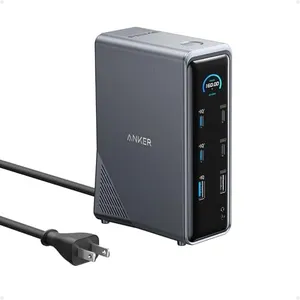
Anker Prime Docking Station, 14-Port with 160W Max Output, 10Gbps Fast Data Transfer, Real-Time Smart Interface, Audio and Ethernet Ports, Dual 4K Displays for Dell, HP, Lenovo and More

Rating
10.0
Chosen by1,137
Port Availability
Power Delivery
Display Support

Most important from
534 reviews

Port Availability
Wide array of ports makes it a versatile addition to any setup, providing everything needed for various devices.
Power Delivery
Easy charging for USB-C and USB-A devices, making it convenient for users with multiple devices.
Display Support
For MacBook users, leveraging the external HDMI port can provide dual display functionality despite macOS limitations.
Compatibility
Flexibility of use is a standout feature, allowing seamless switching between work PCs and personal MacBooks.
Build Quality and Design
The Anker Dock 14-in-1 was incredibly easy to set up and functions flawlessly, fitting seamlessly into the workspace with its minimalist design.
Additional Features
While the dock is a bit pricey, it offers significant value, especially when purchased at a discount.

The Anker Prime Docking Station offers a robust 14-in-1 connectivity solution, making it an impressive choice for users needing multiple port options. With its ability to charge four devices simultaneously through three USB-C ports and one USB-A port, it provides a powerful total output of 160W. This is particularly useful for users who need to keep multiple devices charged efficiently. The docking station supports ultra-fast data transfer rates up to 10Gbps, which ensures quick file transfers and smooth operation for connected devices. Moreover, it includes dual HDMI ports that allow for dual 4K display support, providing crystal-clear video streaming or mirroring. However, it's important to note that for macOS devices, the external monitors will display identical content, limiting the dual display functionality for MacBook Air users.

Compatibility-wise, it supports USB-C, USB4, and Thunderbolt connections, making it versatile across multiple operating systems like Windows and ChromeOS, though it does not support Linux. The build quality is solid with a sleek grey design, fitting well with modern setups. Users looking for a docking station with additional features like audio and Ethernet ports will also find this product beneficial. One limitation to consider is that it does not support monitors with a resolution of 5120*1440. Additionally, while offering broad compatibility, MacBook Air users may not fully benefit from its dual display capabilities.

The Anker Prime Docking Station is an excellent choice for those needing high power delivery and versatile port options, particularly for Windows and ChromeOS users.

Rating
10.0
Chosen by1,137
Port Availability
Power Delivery
Display Support

Most important from
534 reviews

Port Availability
Wide array of ports makes it a versatile addition to any setup, providing everything needed for various devices.
Power Delivery
Easy charging for USB-C and USB-A devices, making it convenient for users with multiple devices.
Display Support
For MacBook users, leveraging the external HDMI port can provide dual display functionality despite macOS limitations.
Compatibility
Flexibility of use is a standout feature, allowing seamless switching between work PCs and personal MacBooks.
Build Quality and Design
The Anker Dock 14-in-1 was incredibly easy to set up and functions flawlessly, fitting seamlessly into the workspace with its minimalist design.
Additional Features
While the dock is a bit pricey, it offers significant value, especially when purchased at a discount.
#2

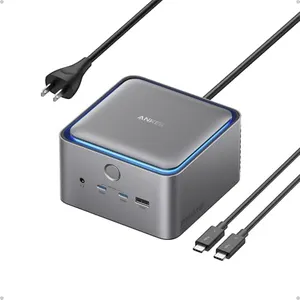
Anker Prime TB5 Docking Station, 14-in-1 Thunderbolt 5 Dock with 120Gbps Max Transfer, Thunderbolt Dock with 140W Max Charging, Cooling System, Up to 8K, Dual Display for TBT 5/4 Laptops

Rating
9.1
Port Availability
Power Delivery
Build Quality and Design

Most important from
320 reviews

Port Availability
The dock delivers blazing-fast 120Gbps transfer speeds, handling massive files and high-resolution displays flawlessly without lag or stuttering.
Power Delivery
With up to 140W charging, it keeps laptops fully powered even during intensive tasks, ensuring uninterrupted productivity.
Build Quality and Design
A sleek design with subtle ambient lighting adds a modern, polished feel to any workspace.
Additional Features
The built-in cooling system effectively prevents overheating, maintaining cool operation despite heavy use.

The Anker Prime TB5 Docking Station offers a rich set of 14 ports, including Thunderbolt 5, USB-C, USB-A, Ethernet, and card readers, making it very versatile for expanding your MacBook Air’s connectivity. Its power delivery is strong, with up to 140W charging through the Thunderbolt 5 upstream port, which means it can efficiently charge your laptop and other devices at the same time.

For display support, it can handle up to 8K@60Hz on a single display, but MacBooks with M1, M2, or M3 chips can only use one external screen, which is an important limitation if you want multiple monitors. The dock also features a smart cooling system to prevent overheating during heavy use, and subtle ambient lighting adds a nice touch without being distracting. Build quality seems solid with a compact and sleek design that fits well on a desk. However, the dock is somewhat heavy at 3.4 pounds and runs nearly 9 inches long, so it takes up some space.

While it supports a wide range of devices including newer MacBooks and Thunderbolt Windows laptops, the dual 8K display feature is limited mainly to Windows machines with full Thunderbolt support. If you need fast file transfers, it excels there with impressive 120Gbps speeds. This docking station is an excellent choice if you want a powerful, all-around hub for your MacBook Air and can accept the single external display limitation on Apple silicon models.

Rating
9.1
Port Availability
Power Delivery
Build Quality and Design

Most important from
320 reviews

Port Availability
The dock delivers blazing-fast 120Gbps transfer speeds, handling massive files and high-resolution displays flawlessly without lag or stuttering.
Power Delivery
With up to 140W charging, it keeps laptops fully powered even during intensive tasks, ensuring uninterrupted productivity.
Build Quality and Design
A sleek design with subtle ambient lighting adds a modern, polished feel to any workspace.
Additional Features
The built-in cooling system effectively prevents overheating, maintaining cool operation despite heavy use.
#3

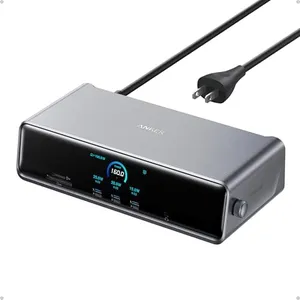
Anker Prime Docking Station (DL7400), 14-Port Triple Display with DisplayLink, 140W Max, Smart Display, Triple 4K 60Hz, Cooling Fan, for macOS and Windows (The Latest DisplayLink Driver Required)

Rating
8.2
Display Support
Build Quality and Design
Compatibility

Most important from
304 reviews

Display Support
The docking station delivers seamless multi-monitor support with no lag or display interruptions, even when closing the laptop lid.
Build Quality and Design
Its sturdy, well-made design feels premium and reliable compared to other flimsy docking stations.
Compatibility
Plug-and-play setup works smoothly after updating laptop software, making it an essential part of a work-from-home setup.
Port Availability
The wide array of ports, including three front-facing USB-C, offers excellent convenience for connecting multiple devices simultaneously.
Additional Features
Internal cooling fan effectively prevents overheating, contributing to stable performance during extended use.

The Anker Prime Docking Station is a strong choice for MacBook Air users who need to connect multiple devices and monitors. It offers an impressive total of 14 ports, including USB-C, USB-A, HDMI, DisplayPort, Ethernet, and card readers, covering almost all connection needs. This versatility makes it ideal if you want to plug in external drives, a wired internet connection, headphones, and up to three monitors at once—including one with ultra-high 8K resolution.

The docking station supports up to 140W power delivery via the main USB-C port to keep your laptop charged, and two additional USB-C ports provide 100W charging power each, although these front ports don’t support video output. The built-in cooling fan and smart display help keep the device from overheating and let you monitor charging and display status easily. It works well with macOS 13.5 or later and Windows, but you must install the latest DisplayLink driver for all features. The sturdy design and included high-quality cables add to its reliability.

Some users have noted that using non-included cables can cause connection problems, and the need for the specific driver might be a hurdle for beginners. Also, while it supports triple displays, only two HDMI ports are present, so one monitor must connect via DisplayPort. If you want a docking station that can handle many devices and multiple high-res monitors with solid charging power in a well-built package, this product is a fitting option. Be prepared to follow setup steps carefully to ensure smooth operation.

Rating
8.2
Display Support
Build Quality and Design
Compatibility

Most important from
304 reviews

Display Support
The docking station delivers seamless multi-monitor support with no lag or display interruptions, even when closing the laptop lid.
Build Quality and Design
Its sturdy, well-made design feels premium and reliable compared to other flimsy docking stations.
Compatibility
Plug-and-play setup works smoothly after updating laptop software, making it an essential part of a work-from-home setup.
Port Availability
The wide array of ports, including three front-facing USB-C, offers excellent convenience for connecting multiple devices simultaneously.
Additional Features
Internal cooling fan effectively prevents overheating, contributing to stable performance during extended use.

Buying Guide for the Best Macbook Air Docking Stations

When choosing a docking station for your MacBook Air, it's important to consider how you plan to use it and what features you need. A docking station can greatly enhance your productivity by providing additional ports and connectivity options. Here are some key specifications to consider when selecting the right docking station for your MacBook Air.
Port AvailabilityPort availability refers to the number and types of ports that the docking station offers. This is important because it determines what devices and peripherals you can connect to your MacBook Air. Common ports include USB-A, USB-C, HDMI, DisplayPort, Ethernet, and audio jacks. If you need to connect multiple devices like monitors, external hard drives, and keyboards, look for a docking station with a variety of ports. For basic use, a docking station with a few USB ports and an HDMI port might suffice.
Power DeliveryPower delivery (PD) is the ability of the docking station to charge your MacBook Air while it is connected. This is important because it ensures that your laptop stays charged and ready to use without needing a separate charger. Power delivery is measured in watts (W). For a MacBook Air, a docking station with at least 45W of power delivery is recommended to ensure efficient charging. If you use your laptop heavily or have multiple devices connected, consider a docking station with higher power delivery.
Display SupportDisplay support refers to the docking station's ability to connect to external monitors. This is important for users who need a larger or multiple screens for multitasking or professional work. Check the resolution and refresh rate supported by the docking station. For basic use, a docking station that supports a single 1080p monitor at 60Hz might be sufficient. For more demanding tasks like video editing or gaming, look for one that supports dual 4K monitors or higher resolutions.
CompatibilityCompatibility ensures that the docking station works seamlessly with your MacBook Air. This is important to avoid connectivity issues and ensure all features work properly. Check if the docking station is specifically designed for MacBook Air or if it is universally compatible. Some docking stations may require additional drivers or software, so it's best to choose one that offers plug-and-play functionality for ease of use.
Build Quality and DesignBuild quality and design refer to the materials and construction of the docking station. This is important for durability and aesthetics, especially if you plan to use it frequently or carry it with you. Look for docking stations made from high-quality materials like aluminum, which offer better heat dissipation and durability. The design should also complement your MacBook Air and fit well in your workspace. Compact and lightweight designs are ideal for portability.
Additional FeaturesAdditional features include any extra functionalities that the docking station offers. This is important for users who need specific features like SD card readers, headphone jacks, or built-in storage. Consider what additional features might be useful for your workflow. For example, if you frequently transfer photos, an SD card reader can be very convenient. If you use wired headphones, an audio jack is essential. Choose a docking station that offers the extra features that match your needs.

FAQ