We Use CookiesWe use cookies to enhance the security, performance, functionality and for analytical and promotional activities. By continuing to browse this site you are agreeing to our privacy policy

10 Best Photo Scanners 2026 in the United States

How do we rank products for you?

Our technology thoroughly searches through the online shopping world, reviewing hundreds of sites. We then process and analyze this information, updating in real-time to bring you the latest top-rated products. This way, you always get the best and most current options available.

headphones-stars

Our Top Picks

#1

Winner

Epson FastFoto FF-680W Wireless High-Speed Photo and Document Scanning System, Black

Rating
10.0
Chosen by1,341
Resolution
Scan Speed
Software

Most important from
3268 reviews

Resolution
One caveat: keep in mind that the super-fast scans (no more than a second per photo) produce photos that are 300 dots per inch; if you want to scan at a higher dpi, the scanner is a lot slower.
Scan Speed
This scanner completely lives up to its billing as 'the world's fastest personal photo scanner.'
Software
The enhancement features of the software are especially nice, including image straightening and color/brightness correction, both of which work flawlessly.
Document Handling
In two days, I scanned more than 4,000 photos without a hitch -- the scanner worked flawlessly across all different sizes of photos.

The Epson FastFoto FF-680W is a versatile photo and document scanner that stands out in the photo-scanning category due to its fast performance and user-friendly features. It boasts the title of the world’s fastest personal photo scanner, able to scan at a remarkable speed of one photo per second at a resolution of 300 dpi. This speed is perfect for users looking to digitize large collections efficiently. With the ability to batch-scan up to 36 photos at once, it’s especially suitable for those with multiple pictures to organize or preserve.

One notable strength is its range of scanning capabilities. It can handle various photo types, including Polaroids and postcards, while also offering flexibility in image quality options from quick sharing to high-resolution archiving. The included Epson ScanSmart software enhances its functionality, allowing users to convert scanned images into text with optical character recognition, which is handy for document management.

While it excels in scanning photos quickly, the maximum optical resolution is 600 dpi, which may not satisfy users requiring extremely high detail for fine art or archival purposes. Additionally, the unit weighs 8.2 pounds, which could be a bit cumbersome for individuals looking for a highly portable option. Connectivity options are a strong point, with both USB and wireless capabilities, making it easy to set up in different environments. However, some users may find the initial Wi-Fi setup a bit tricky if they are not tech-savvy. Lastly, while the scanner can handle delicate photos safely with its SafeTouch technology, it's still wise to be cautious with especially fragile items.

The Epson FastFoto FF-680W is a great choice for anyone looking to quickly and easily digitize their photos and documents, particularly for those who value speed and the ability to batch-scan. For the highest-quality archival work or extreme portability, considering other options may be beneficial.

Rating
10.0
Chosen by1,341
Resolution
Scan Speed
Software

Most important from
3268 reviews

Resolution
One caveat: keep in mind that the super-fast scans (no more than a second per photo) produce photos that are 300 dots per inch; if you want to scan at a higher dpi, the scanner is a lot slower.
Scan Speed
This scanner completely lives up to its billing as 'the world's fastest personal photo scanner.'
Software
The enhancement features of the software are especially nice, including image straightening and color/brightness correction, both of which work flawlessly.
Document Handling
In two days, I scanned more than 4,000 photos without a hitch -- the scanner worked flawlessly across all different sizes of photos.
#2

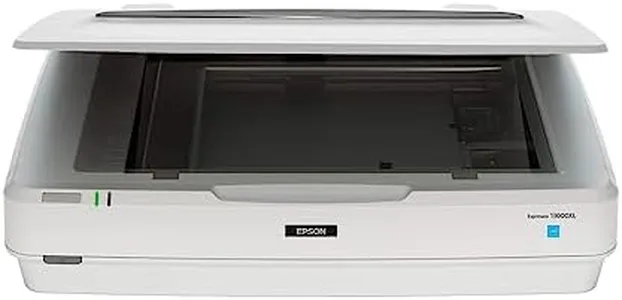
Epson Expression 13000XL Archival Photo and Graphics Flatbed Scanner

The Epson Expression 13000XL is a capable flatbed scanner designed for professional-quality photo and graphics scanning. One of its significant strengths is its impressive resolution of 2400 x 4800 dpi, which ensures exceptional image quality and detail. This makes it an excellent choice for photographers and artists who need to capture intricate designs or vibrant colors accurately. The scanner also boasts advanced technologies like Epson Micro Step Drive and MatrixCCD, which enhance color accuracy and clarity, making it ideal for archival purposes.

Another strong feature is the one-touch color restoration, which allows users to quickly restore faded photos with just a simple press, perfect for those who want to revive old memories without hassle. The inclusion of powerful software, such as LaserSoft Imaging SilverFast Ai, further enhances its functionality, allowing users to calibrate their scans effectively. On the productivity side, the batch scanning capability is a great asset, letting users scan multiple images at once, which is beneficial for large projects, such as digitizing family photo albums or extensive art collections. The scanner's seamless integration with various imaging software adds to its versatility.

However, there are some drawbacks to consider. With a weight of 31.5 pounds and dimensions of 18 x 25.8 x 6.2 inches, this scanner is relatively large and may not be the best choice for users with limited workspace or those who require portability. Additionally, the optional transparency unit, while a great feature for scanning film, incurs extra cost, which could be a consideration for budget-conscious buyers. The Epson Expression 13000XL excels in image quality and features suitable for professional use. It's particularly beneficial for photographers, artists, and anyone looking to preserve and restore high-quality images. However, its size and weight might be a limiting factor for casual users or those needing a more portable scanning solution.

#3

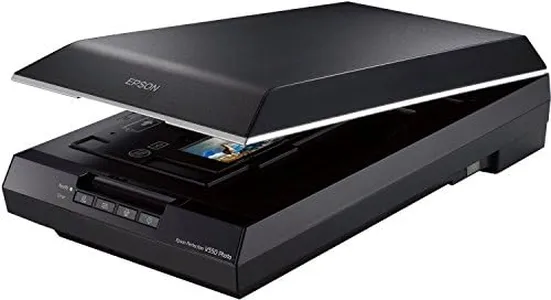
Epson Perfection V550 Color Photo, Image, Film, Negative & Document Scanner with 6400 DPI Optical Resolution

Rating
8.5
Resolution
Software
Size and Portability

Most important from
1415 reviews

Resolution
The quality of scanned negatives, even those 65 years old, is amazing and clear as day.
Software
Digital ICE and Color Restoration features save time and enhance photo quality, though Digital ICE Light only works on negatives.
Size and Portability
Despite its bulk, the versatility in scanning different sizes of negatives and documents adds significant value.
Document Handling
The Epson V550 produces excellent quality photos, making it well worth the investment.

The Epson Perfection V550 is a versatile photo scanner that excels in several key areas. With a high optical resolution of 6400 dpi, it allows for sharp and detailed enlargements up to 17 x 22 inches, making it a great choice for those looking to preserve and enhance their photo collections. The scanner’s 48-bit color depth ensures vibrant and true-to-life color reproduction, which is ideal for photo enthusiasts and professionals alike. It also includes Digital ICE technology to remove dust and scratches from film, and an easy photo fix feature to restore faded photos, which are valuable tools for photo restoration projects.

The scanner supports 35mm slides, negatives, and film with its built-in transparency unit, adding to its versatility. Another strength is the ReadyScan LED technology, which provides fast scanning with no warmup time, enhancing productivity. The Epson V550 also offers useful features like auto edge detection, which can scan multiple photos at once and save them as separate files, and the ABBYY FineReader Sprint Plus OCR for converting scanned documents into editable text.

However, there are a few drawbacks to consider. The scanner is relatively bulky and heavy (9.6 pounds and dimensions of 11.02"D x 19.09"W x 4.64"H), which might be a downside for users seeking a more portable option. Additionally, it only offers USB 2.0 connectivity, which may be slower compared to the latest connectivity options. Despite these minor weaknesses, the Epson Perfection V550 is a solid choice for those needing a comprehensive photo scanner with excellent resolution, color depth, and useful restoration features.

Rating
8.5
Resolution
Software
Size and Portability

Most important from
1415 reviews

Resolution
The quality of scanned negatives, even those 65 years old, is amazing and clear as day.
Software
Digital ICE and Color Restoration features save time and enhance photo quality, though Digital ICE Light only works on negatives.
Size and Portability
Despite its bulk, the versatility in scanning different sizes of negatives and documents adds significant value.
Document Handling
The Epson V550 produces excellent quality photos, making it well worth the investment.

Buying Guide for the Best Photo Scanners

Choosing the right photo scanner can be a game-changer for preserving your precious memories and important documents. The right scanner will offer the perfect balance of quality, speed, and ease of use. To make an informed decision, it's essential to understand the key specifications and how they align with your needs. Here are the main specs to consider when selecting a photo scanner.
ResolutionResolution, measured in dots per inch (DPI), determines the level of detail a scanner can capture. Higher DPI values mean better image quality and more detail. For general photo scanning, a resolution of 300-600 DPI is usually sufficient. If you need to scan photos for professional use or large prints, look for scanners with 1200 DPI or higher. Consider your end use: for casual sharing and archiving, lower DPI is fine, but for high-quality prints or detailed work, opt for higher DPI.
Color DepthColor depth, measured in bits, indicates how many colors a scanner can capture. Higher color depth means more accurate and vibrant colors. Most photo scanners offer 24-bit color depth, which is adequate for most users. However, for professional photo editing or archiving, a 48-bit color depth scanner will provide superior color accuracy and detail. Choose based on your need for color precision: standard use can go with 24-bit, while professional needs should look for 48-bit.
Scan SpeedScan speed is how quickly a scanner can process an image, usually measured in seconds per page. Faster scan speeds are beneficial if you have a large number of photos to scan. For occasional use, scan speed may not be as critical, but for bulk scanning projects, look for scanners that can handle multiple pages per minute. Determine your volume of scanning: for high-volume tasks, prioritize faster speeds, while for occasional use, speed may be less of a concern.
ConnectivityConnectivity options, such as USB, Wi-Fi, or Bluetooth, determine how you can connect the scanner to your computer or other devices. USB is the most common and reliable, but Wi-Fi or Bluetooth can offer more flexibility, especially if you want to scan directly to cloud services or mobile devices. Consider your workflow: if you need flexibility and convenience, wireless options are great, but for straightforward, reliable connections, USB is sufficient.
SoftwareThe software that comes with a scanner can greatly affect your scanning experience. Good software can offer features like automatic color correction, dust and scratch removal, and easy file organization. Look for scanners that come with user-friendly software that meets your needs. If you need advanced editing features, ensure the software supports those functions. Think about your post-scan needs: basic users can go with simpler software, while advanced users should look for more robust options.
Size and PortabilityThe size and portability of a scanner can be important if you have limited space or need to move the scanner frequently. Compact and portable scanners are great for small spaces or on-the-go scanning, while larger scanners may offer more features and better performance. Assess your space and mobility needs: for home or office use with ample space, larger models are fine, but for limited space or travel, compact models are better.
Document HandlingDocument handling refers to the scanner's ability to process different types and sizes of documents. Some scanners come with automatic document feeders (ADF) for batch scanning, while others may have flatbeds for delicate or varied-sized photos. If you need to scan a variety of document types or large volumes, look for scanners with versatile document handling capabilities. Match the scanner to your document types: for mixed media and high volume, ADF is useful, while for delicate or varied sizes, a flatbed is ideal.

FAQ