We Use CookiesWe use cookies to enhance the security, performance, functionality and for analytical and promotional activities. By continuing to browse this site you are agreeing to our privacy policy

10 Best Stylus Pens 2026 in the United States
How do we rank products for you?

Our technology thoroughly searches through the online shopping world, reviewing hundreds of sites. We then process and analyze this information, updating in real-time to bring you the latest top-rated products. This way, you always get the best and most current options available.

headphones-stars

Our Top Picks

#1

Winner

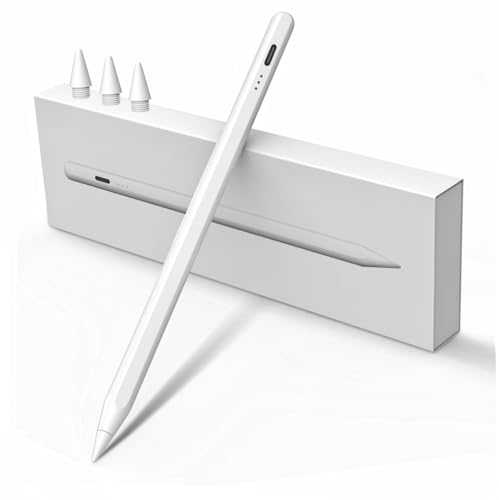
Apple Pencil Pro: Latest Model - Device Compatibility Check Required - Pixel-Perfect Precision, Tilt and Pressure Sensitivity, Ideal for Note-Taking, Drawing, and Art. Charges and Pairs Magnetically

Rating
10.0
Chosen by1,177
Pressure Sensitivity
Tilt Recognition
Battery Life

Most important from
7796 reviews

Pressure Sensitivity
Pixel-perfect precision makes drawing and writing incredibly natural and accurate, with flawless pressure sensitivity and tilt functionality.
Tilt Recognition
Pixel-perfect precision makes drawing and writing incredibly natural and accurate, with flawless pressure sensitivity and tilt functionality.
Battery Life
Battery life is excellent, and charging is super convenient thanks to magnetic wireless charging.
Additional Features
Gesture controls like the new squeeze feature are intuitive and speed up workflow without needing to open menus.

The Apple Pencil Pro is a premium stylus designed primarily for creative users and note-takers who own recent iPad models like the iPad Pro (M4, M5), iPad Air (M2, M3), or iPad mini (A17 Pro). It excels in offering pixel-perfect precision with advanced pressure sensitivity and tilt recognition, which means you can draw or write with natural variation in line thickness and shading, very much like using a real pencil. Palm rejection technology is implied, ensuring your hand won’t interfere while writing or sketching. The stylus attaches magnetically to compatible iPads for effortless wireless pairing and charging, making battery management easy with a solid built-in battery that lasts through extended use.

The aluminum body feels sturdy and comfortable to hold, with a flat edge that supports gesture controls like tapping to switch tools or squeezing to change brush types — useful features for artists and professionals who want quick access without tapping menus. It also includes haptic feedback for subtle vibrations, which helps create a more tactile, satisfying drawing experience. The tip material is high quality and designed for smooth interaction. The Apple Pencil Pro is only compatible with specific newer iPad models, so it’s important to check your device before purchasing.

This stylus is ideal for people who want a seamless, high-end drawing and note-taking experience integrated tightly with the Apple ecosystem, especially creative professionals and students who benefit from its advanced tools and precision.

Rating
10.0
Chosen by1,177
Pressure Sensitivity
Tilt Recognition
Battery Life

Most important from
7796 reviews

Pressure Sensitivity
Pixel-perfect precision makes drawing and writing incredibly natural and accurate, with flawless pressure sensitivity and tilt functionality.
Tilt Recognition
Pixel-perfect precision makes drawing and writing incredibly natural and accurate, with flawless pressure sensitivity and tilt functionality.
Battery Life
Battery life is excellent, and charging is super convenient thanks to magnetic wireless charging.
Additional Features
Gesture controls like the new squeeze feature are intuitive and speed up workflow without needing to open menus.
#2

Apple Pencil (USB-C): Device Compatibility Check Required - Pixel-Perfect Precision, Tilt Sensitivity, Ideal for Note-Taking, Drawing, and Signing Documents. Charges and Pairs with USB-C

Rating
9.7
Compatibility
Pressure Sensitivity
Battery Life

Most important from
9446 reviews

Compatibility
Magnetic attachment and charging on compatible iPads provide a seamless and tidy user experience.
Pressure Sensitivity
The precision and responsiveness make writing and drawing feel as natural and smooth as using a real pen, with zero lag.
Battery Life
Battery life is impressive, lasting through full-day use without needing frequent recharging.

The Apple Pencil (USB-C) is a premium stylus designed primarily for a wide range of compatible iPad models, including various iPad Pro, iPad Air, iPad Mini, and standard iPad generations. It excels in delivering pixel-perfect precision and low latency, which means your lines and strokes appear quickly and accurately on screen, making it excellent for detailed drawing, note-taking, and signing documents. Tilt sensitivity allows you to shade or create angled lines naturally, similar to using a traditional pencil.

It pairs and charges conveniently through a USB-C connection and magnetically snaps onto the iPad for easy storage and power. The tip is made from durable material. Battery life is powered by a built-in rechargeable lithium-ion battery, included out of the box, which should last through typical daily use. Additional features like Apple Pencil hover on newer iPad Pro and Air models add preview functionality before making a mark, enhancing creative workflows.

This stylus is best suited for users deeply integrated into the Apple ecosystem looking for a reliable, high-performance pen for creative and productivity tasks. The Apple Pencil only works with specific iPads, so checking device compatibility before purchase is essential. For those seeking a stylus that pairs flawlessly with an iPad and offers advanced drawing features, this is a solid choice, though it comes at a higher price point compared to generic styluses.

Rating
9.7
Compatibility
Pressure Sensitivity
Battery Life

Most important from
9446 reviews

Compatibility
Magnetic attachment and charging on compatible iPads provide a seamless and tidy user experience.
Pressure Sensitivity
The precision and responsiveness make writing and drawing feel as natural and smooth as using a real pen, with zero lag.
Battery Life
Battery life is impressive, lasting through full-day use without needing frequent recharging.
#3

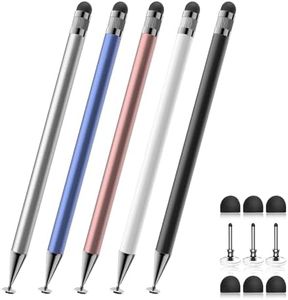
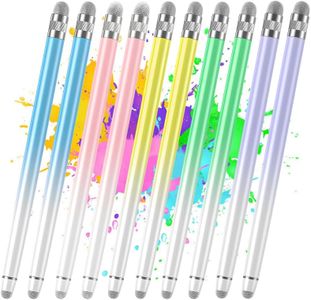
Bopomofo Stylus (5 Pcs), 2-in-1 Stylus Pen for Touch Screen, High Precision and Sensitivity, Suitable for iPhone/ipad/Android Tablets, Compatible with Touch Screens (Black/White/Blue/Rose Gold/Silver)

Rating
8.2
Compatibility
Battery Life
Tip Material and Replaceability

Most important from
7905 reviews

Compatibility
Works flawlessly across multiple devices including iPads, iPhones, and Surface Pro, offering excellent compatibility.
Battery Life
Completely eliminated the need for expensive styluses by delivering almost all essential functions without charging or pairing.
Tip Material and Replaceability
The movable tip design works well at many angles, enhancing convenience and usability.
Additional Features
Glides smoothly over the screen, making it perfect for drawing lines and general use.

The Bopomofo Stylus (5-pack) is a good choice if you want a reliable, no-fuss stylus for general touchscreen use on devices like iPhones, iPads, and various Android tablets. Its 2-in-1 design offers both a rubber tip and a transparent disc tip, which helps with accuracy and allows you to see exactly where you’re drawing or writing. This makes it quite handy for note-taking, sketching, or just navigating your device more precisely than your finger. It fits well with many popular devices and operating systems, so compatibility shouldn’t be an issue.

One of its biggest advantages is that it requires no batteries or charging, making it always ready to go and maintenance-free. The aluminum body feels sturdy yet lightweight, which is comfortable to hold for longer use. Plus, you get five styluses in different colors along with extra replaceable tips, which adds good value.

This stylus set is best suited for casual users, students, or professionals who want a simple tool to improve their touchscreen interaction without worrying about charging or compatibility. It’s particularly useful if you prefer a pen-like feel but don’t need high-end drawing features. However, it lacks advanced features like pressure sensitivity, tilt recognition, and palm rejection, so it might not be the best pick for serious artists or those needing detailed drawing capabilities. Since it doesn’t have any electronic components, it won’t offer the nuanced control some digital art apps provide, and the disc tip may wear down faster depending on usage.

Rating
8.2
Compatibility
Battery Life
Tip Material and Replaceability

Most important from
7905 reviews

Compatibility
Works flawlessly across multiple devices including iPads, iPhones, and Surface Pro, offering excellent compatibility.
Battery Life
Completely eliminated the need for expensive styluses by delivering almost all essential functions without charging or pairing.
Tip Material and Replaceability
The movable tip design works well at many angles, enhancing convenience and usability.
Additional Features
Glides smoothly over the screen, making it perfect for drawing lines and general use.

Buying Guide for the Best Stylus Pens

Choosing the right stylus pen can greatly enhance your digital drawing, note-taking, or navigation experience. The right stylus pen will depend on your specific needs, such as the type of device you are using, the tasks you want to accomplish, and your personal preferences for comfort and functionality. Here are some key specifications to consider when selecting a stylus pen.
CompatibilityCompatibility refers to whether the stylus pen works with your device. This is crucial because not all stylus pens are universal. Some are designed specifically for certain tablets or smartphones. To navigate this, check the manufacturer's specifications to ensure the stylus pen is compatible with your device. If you use multiple devices, you might want a stylus that works across different platforms. Your need for compatibility will guide you to choose a stylus that seamlessly integrates with your device.
Pressure SensitivityPressure sensitivity measures how well the stylus can detect variations in pressure, which is important for tasks like drawing or writing. Higher pressure sensitivity allows for more nuanced and detailed work. Stylus pens typically range from 1,024 to over 8,192 levels of pressure sensitivity. If you are an artist or someone who needs precision, opt for higher pressure sensitivity. For general note-taking or navigation, lower sensitivity levels may suffice.
Tilt RecognitionTilt recognition allows the stylus to detect the angle at which it is being held, which can affect the stroke and shading in drawing applications. This feature is particularly important for artists who need to create varied effects. Stylus pens with tilt recognition can offer a more natural drawing experience. If you are an artist or designer, this feature will be beneficial. For basic tasks, tilt recognition may not be necessary.
Palm RejectionPalm rejection technology prevents the screen from registering your hand or wrist while using the stylus. This is important for a comfortable and uninterrupted writing or drawing experience. Stylus pens with good palm rejection allow you to rest your hand on the screen without causing unwanted marks. If you plan to use the stylus for extensive writing or drawing, this feature is essential. For occasional use, it might be less critical.
Battery LifeBattery life indicates how long the stylus pen can be used before needing a recharge. This is important for uninterrupted use, especially during long sessions. Stylus pens can have varying battery lives, from a few hours to several days. If you use the stylus frequently or for extended periods, look for one with a longer battery life. For infrequent use, shorter battery life may be acceptable.
Tip Material and ReplaceabilityThe tip material affects the feel and durability of the stylus. Common materials include rubber, plastic, and metal. Replaceable tips are important for maintaining the stylus's performance over time. Softer tips provide a more pen-like feel, while harder tips offer more precision. If you use the stylus heavily, consider one with replaceable tips to extend its lifespan. For light use, the tip material may be less of a concern.
Additional FeaturesAdditional features such as shortcut buttons, erasers, and Bluetooth connectivity can enhance the functionality of the stylus. Shortcut buttons can speed up your workflow by providing quick access to frequently used functions. An eraser feature can make corrections easier. Bluetooth connectivity can offer advanced features like pressure sensitivity adjustments and custom settings. Consider these features based on your specific needs and how they can improve your user experience.

FAQ